
Lion Blau

A tap-to-earn game built as a configurable system
Role: Product Designer — art direction, UX/UI, LiveOps, front-end · Dropee (fka Tropee)
2022–2026
Dropee is a Telegram-native tap-to-earn game built for fast, repeatable play inside chat. As sole product designer, I shaped the core loop, reusable LiveOps systems, and TGE-ready UX—turning a simple tapping mechanic into a scalable product system for retention, events, and long-term progression.
Role: Product Designer — art direction, UX/UI, LiveOps, front-end · Dropee (formerly Tropee) · 2022–2026
A tap-to-earn game built as a configurable system

7.5M+
peak monthly users
13M+
total users
3M+
connected wallets
#1
DappRadar on TON
5B+
main-wheel spins
These numbers reflect Dropee's total product growth as a small team; my role was end-to-end design across the core loop, LiveOps systems, and token UX, working with product and engineering toward retention, virality, and TGE-readiness goals set by leadership.
Context / Opportunity
Designing games for Telegram, not app stores
Dropee wasn’t designed for app stores.
It was designed for Telegram: a chat-native environment where discovery happens through links, forwards, screenshots, and bot messages, and where players expect instant entry with almost no setup. That changed the product challenge. We had to make the game fast to start, light enough to revisit in short sessions, and easy to share—while still deep enough, through progression, economy, and LiveOps, to keep players engaged beyond the first curiosity tap.

The game opens inside Telegram

Challenges
What made this hard
The hard problems weren't visual — they were structural. With no app store to lean on, the game had to earn its own distribution by being worth sharing.
LiveOps were being built as one-off features, which couldn't survive the team's shipping pace — I made the case for treating events as configurable data instead, building the NocoDB schema alongside the first event rather than "systematizing later." Each new season raised the same tension between novelty and familiarity, so I argued for targeted redesigns of only the surfaces players touch most — visible change where it signals freshness, stability in the core loop that carries retention.
The token layer had to serve two audiences in one interface: casual tappers who just wanted to play, and crypto-native players heading toward airdrops and staking. Keeping $DROPEE optional but present let us support TGE-readiness without taxing day-one retention.

Every choice on this project traded off two things we couldn't have at full strength.
Role & RESPONSIBILITIES
Owning the game
experience end to end
I owned Dropee’s end-to-end game experience across the Telegram mini-app, including the core loop, UX flows, LiveOps surfaces, and event visual language. I worked with product and engineering to turn goals like retention, virality, and TGE-readiness into concrete mechanics such as Daily Combo, Question of the Day, and repeatable event surfaces designed for Telegram’s constraints. Beyond core gameplay, I led the design of the LiveOps system and the reusable component language that underpins it—from high-level interaction patterns to production-ready UI details.
Owned
-
Core loop and UX flows
-
LiveOps surfaces and repeatable event patterns
-
Telegram-native interaction design
-
Event visual language and reusable UI components
Partnered with
-
Product strategy, retention, and feature framing
-
Engineering implementation and system constraints
Influence
The LiveOps package system started as a design-side proposal. Events were being built as one-off features; I made the case for treating them as configurable data instead — building the NocoDB layer alongside the first LiveOps rather than systematizing "later" — and prototyped the first package on Lovable. That model became the team's standard way of authoring events. I also shaped how Dropee evolved between seasons: when the lean option was to carry the same look forward season after season, I argued that targeted redesigns of the surfaces players touch most would keep the game feeling alive — visible change where it signals novelty, stability in the core loop that carries retention. That became the seasonal pattern, and it's why players never had to relearn the game as it grew.
Design System

Shared buttons, navigation, feedback states, and event patterns reused across Dropee’s core surfaces.
Selected product surfaces


Splash

Home

LiveOps event

Utility modal
Selected product surfaces
Splash
Home
LiveOps event
Utility modal
CORE GAMEPLAY LOOP & DAILY SYSTEMS
Design strategy:
short sessions, long arcs
Dropee’s core loop was deliberately simple: tap to earn coins, spend them on upgrades or milestones, and see progress respond instantly. I shaped the 30–60 second session around a few clear actions—open the bot, tap, claim, maybe make one upgrade—then layered in lightweight daily systems like Daily Quests, Daily Combo, and Question of the Day to add direction, novelty, and reward pacing without turning the experience into a grind. The goal was to make short sessions feel rewarding on their own, while still feeding longer progression arcs over time.
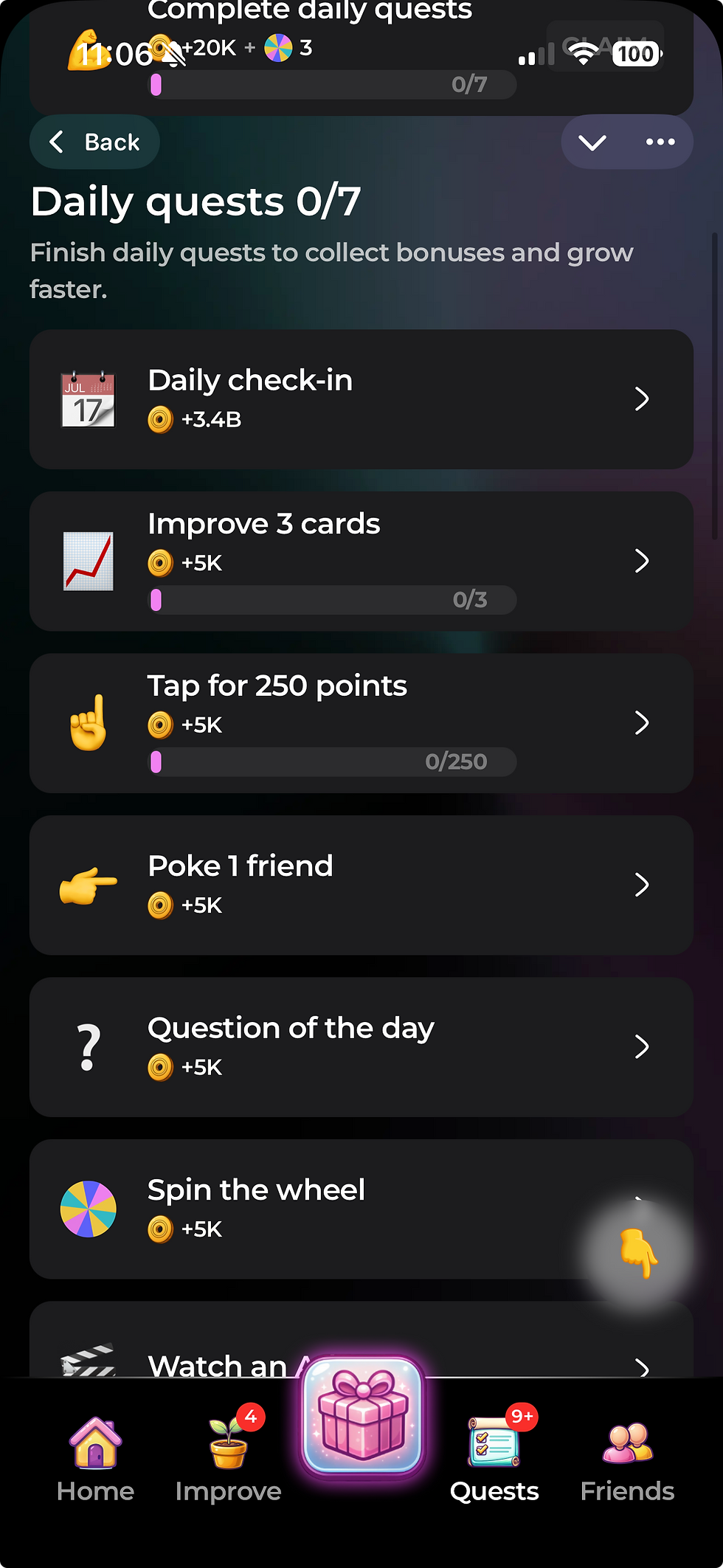


Daily systems added direction, novelty, and reward pacing without extending the core session.
monetization surfaces
Designing the offer, not just the shop
As the sole product designer, I owned every monetization surface across two Dropee seasons, Beetz and Stakerz—including shops, boosters, welcome packages, contextual offers, seasonal promotions and Telegram Stars purchase flows. I defined the interactions, produced the final artwork, and worked with product and engineering to ship them inside the live games.
Matching the offer to player intent
Sessions lasted 30–60 seconds, so an interruption could cost us the session before it created a purchase. I designed two versions of the spin offer around demonstrated intent: Players who entered the wheel without enough spins saw one calm option at one price, and players who actively tapped Spin with an empty balance had already tried to continue, so they saw three packages with a clearer value comparison.
Both versions kept a live countdown showing when three spins would regenerate for free. The timer served two purposes: it reassured players that the wheel remained accessible without paying, while making the cost of waiting concrete. By comparing a visible delay with immediate continuation, the purchase became an accelerator rather than an access fee.
In a Telegram mini-app—with no installation and almost no switching cost—I prioritised this transparent time trade: wait and continue for free, or pay to continue instantly. This followed an established free-to-play pattern, but its effect remained a design hypothesis. Ideally, we would have tested the countdown’s visibility and messaging against purchase conversion, offer dismissal, and return behaviour.

Entering the wheel without spins: single option, free countdown below.

Tapping spin with an empty balance: the escalated three-tier version.
Making value readable at mobile scale
At 375px, every package had to communicate its value almost instantly. Progressive tier names—Warm Up, Push Ahead and Beast Mode—combined with increasingly prominent reward artwork to create a visual progression between the options.
I used one restrained “Best Offer” marker to establish a clear value anchor without turning every card into a competing promotion. Elsewhere in the shop, explicit quantities, availability limits and countdowns replaced vague urgency, while a free Mystery Box introduced the reward format before players encountered the paid tiers.

Tier names, reward scale and one value anchor make the packages easy to compare without explanatory copy.

Season 2 shop: bundles and spin packs under one Best Offer anchor.

A free Mystery Box introduces the reward experience before the paid versions appear.

Specific limits and countdowns communicate urgency more credibly than generic promotional language.
Guiding the payment decision
Dropee supported Telegram Stars and alternative payment methods with different fee structures. At checkout, I highlighted the commercially preferred option with a visible discount, while keeping every alternative transparently priced and one tap away.
This guided players toward the lower-cost payment route without hiding their choices or adding friction to the purchase flow.
.webp)
The full checkout keeps all payment methods visible at the same decision point.

1. Preferred route — strongest treatment and largest discount

2. Standard option — remains clearly available

3. Alternative route — visible without leaving the purchase flow
Scaling these monetization surfaces—and the seasonal content around them—required a visual production system that could create variety without losing Dropee’s identity.
Visual System & AI Art Direction
Scaling art direction with GenAI
To support monetization and seasonal LiveOps at speed, I built a repeatable visual production system for offer artwork, event icons, backgrounds, currencies, and badges. I defined the rules for form, palette, lighting, depth, and composition, then trained a dedicated Dropee V2 LoRA to generate starting points within that visual language.
For each event family—including Valentine’s Day, Carnival, and St. Patrick’s Day—I created a compact design kit covering icon shapes, background composition, badge framing, and screen treatments. Scenario and Weavy accelerated exploration, but I selected and refined the results in Figma, adjusting colour, contrast, hierarchy, and depth so they worked as interface assets rather than standalone illustrations.

Style rules + generation workflow

Assets prepared for LiveOps
One production system, three event families: style-controlled generation became a consistent set of icons, backgrounds, badges and finished screens.
Preparing assets for live product conditions
The assets were designed for localisation and responsive behaviour. Screen copy remained editable, compositions protected flexible text areas, and focal elements stayed centred so the artwork could withstand different crops. Final exports were compressed to WebP to protect loading performance inside the Telegram mini-app.
This system allowed me to prototype a complete event language—icon, background, badge and screen treatment—within a day, while keeping every theme recognisably Dropee.
Testing motion before rollout
I also prototyped animated promotional assets and tested transparent WebM exports inside the Telegram webview. The animation worked in our Android tests but not reliably on iOS, so we stopped before rollout. Testing it early prevented us from committing further production effort to a format we could not support consistently.

Generated motion concept →

Background keyed and exported with alpha →

Tested inside the Telegram webview
Motion prototype tested from generated concept through transparent in-game export.
LIVEOPS & VIBECODING
Designing LiveOps as reusable product packages
Turning LiveOps into a configurable product system
To keep LiveOps fresh without rebuilding them from scratch, I treated them as reusable product packages rather than one-off features. Together with our backend team, I defined a NocoDB schema that describes each event in the same way—steps, costs, rewards, cosmetics, and timing—so a “Pathway” LiveOp becomes data the game can read and render. Over time, I pushed that into a reusable prompt framework where we could duplicate an event, change a handful of variables, and generate a new LiveOp from the same building blocks.
---
package: Badge Room — Trophy Cabinet
type: Reusable LiveOp package
surface: mobile-first iframe widget
authoring knobs: theme / thresholds / reward mix / pacing
---
<runtime_contract>
parent → widget: INIT_DATA / PROGRESS_UPDATE / PAYMENT_RESULT widget → parent: READY / CLAIM / CLOSE / HAPTIC raw payloads are normalized into a clean internal model
</runtime_contract>
<playable_logic>
players earn event currency and unlock badges sequentially claimable = next threshold reached with enough balance claimed badges update cabinet state and trigger celebration all-complete state opens final reward overlay
</playable_logic>
<experience_rules>
skeuomorphic 3D cabinet with glass shelves, jewel lights, pedestals mobile-first layout (~375px), HSL-only system, fixed CTA dimensions same package can be reused by changing theme, thresholds, and rewards
</experience_rules>
… plus visual direction, motion, constraints, and implementation layers
Package Metadata
Runtime Contract
Experience Rules
Authoring spec → Parent config →
LiveOp package → Player experience
Spec → Config → Package → Experience
A reusable LiveOps package defining logic, communication, and experience rules.
I designed this framework so LiveOps could be authored more like reusable packages than bespoke screens. Each package defines the event’s runtime contract, progression logic, and experience rules, while backend translates the spec into config and frontend renders it as a playable event. That made it possible to iterate at the speed of design decisions, keep the UX consistent across different themes, and create a foundation for future community-authored events without breaking the game’s structure.
Each package defined
-
event metadata
-
runtime communication
-
progression logic
-
reusable experience rules


Reusable package in NocoDB
LiveOp draft in Lovable

Shaped in Lovable, then structured in NocoDB as reusable LiveOp packages
Design → Structure
From reusable families to finished LiveOps
With the data layer in place, I used Lovable as an implementation-near design workspace to turn reusable families into polished LiveOps packages. Each family defined the core mechanic; my role was to shape the package layer on top—layout, narrative, hierarchy, states, progress, buttons, and feedback—until the LiveOp felt like a finished mini-game inside Dropee rather than a skinned template.
Starting from a base family file, I created new layouts, refined hierarchy, tuned spacing, and adapted states across themes until each package felt production-ready on mobile. I then connected it to NocoDB, tested it inside Dropee’s Telegram flow, and iterated on readability and feedback so one family could support multiple packages without extra engineering work.
Production assets and content are filled through NocoDB

Base family file from backend
→

LiveOp package designed in Lovable
Because the pipeline is so fast, I can prototype whole event looks in a day:
-
Generate a theme pack in Scenario with the Dropee V2 LoRA.
-
Drop assets into Figma and Lovable to skin a new LiveOp.
-
Wire the event via NocoDB and test it live on my phone.
Assets prepared for LiveOps
This let us ship “games within the game” with distinct iconography, backgrounds, and badges while preserving one coherent Dropee visual language.
CX, Economy and TGE‑ready UX
Keeping the crypto layer optional but present
For many players, Dropee was “just a game” they opened between messages; for others, it was also a path into real token participation. I designed the crypto layer as optional but present: clearly signposted paths for learning about $DROPEE, joining airdrops, and connecting a wallet, all kept out of the way of players who only wanted to tap and play. The goal was to keep onboarding ultra-clean while making token depth feel like a natural continuation of the game rather than a hard mode-switch.
More broadly, I shaped the $DROPEE layer as a set of adjacent experiences that felt like extensions of Dropee rather than separate DeFi products. Inside the Telegram mini-app, players saw light-touch prompts—airdrop teasers, simple token explainers, and one primary next step. When they chose to go deeper, the presale launchpad and the airdrop claiming + staking dApp reused familiar game patterns like progress, rewards, and minimal forms, so connecting a wallet, depositing, claiming, or staking still read as managing progress in the Dropee world, not navigating a financial dashboard.

In-game token layer
From lightweight in-game prompts to deeper wallet flows, the token layer formed one continuous ownership journey.

Airdrop claiming + staking dApp

Presales launchpad
OUTCOMES & REFLECTION
What changed for players, the product, and my design approach
Dropee evolved from a simple tap-to-earn loop into one of Telegram’s most visible game ecosystems, with Daily Combo, Question of the Day, LiveOps events, and TGE-ready UX becoming part of how players understood “playing Dropee,” not just collecting a one-off reward. Season 2 proved that we could layer in airdrops, seasonal events, badges, and deeper progression systems while keeping the core loop lightweight, legible, and easy to return to.
More importantly, the project proved that a live game could grow across seasons and business milestones without forcing players to relearn the interface. I helped turn Dropee from a single game loop into a repeatable product system: one that could support new event structures, visual refreshes, token participation, and broader LiveOps ambitions while preserving trust in the core experience.

Core loop established
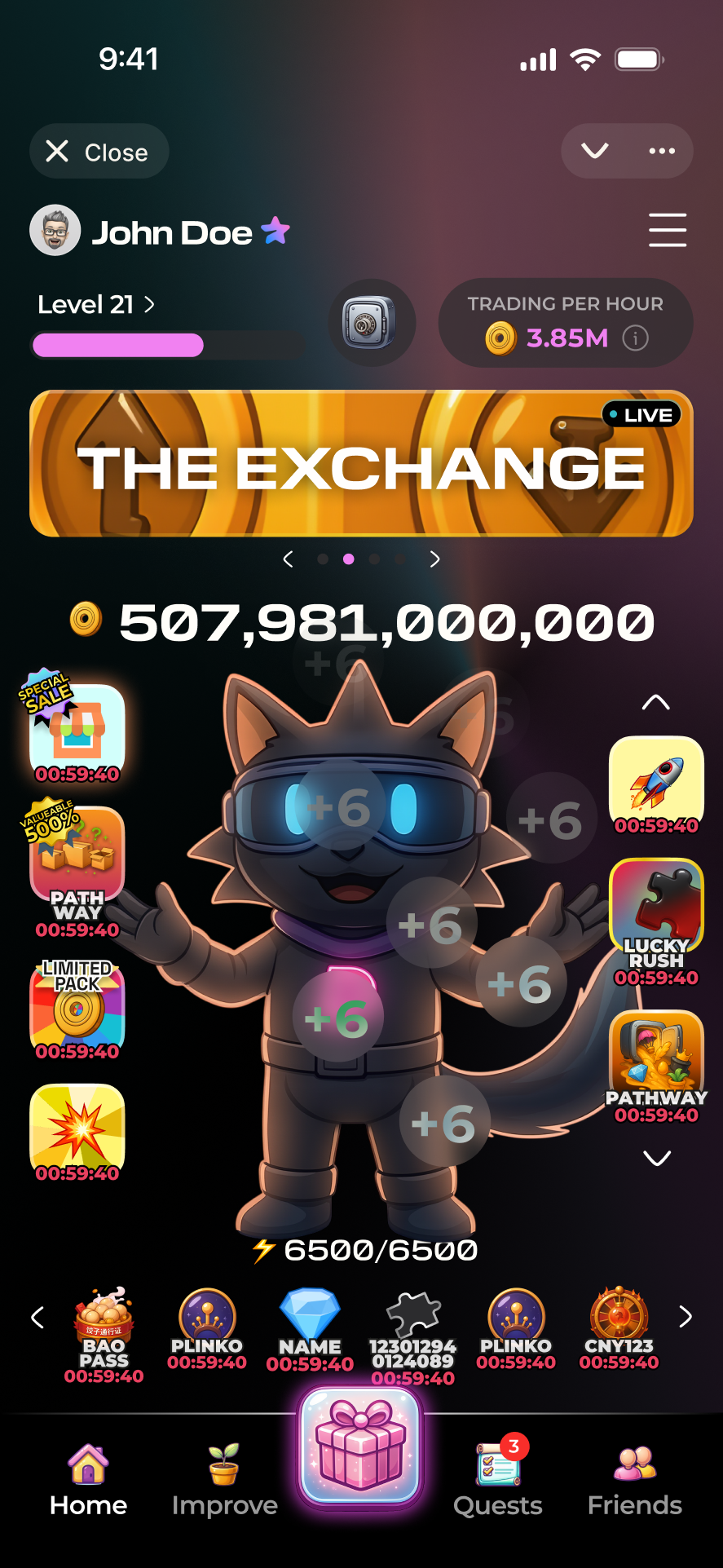
Daily systems and LiveOps layered in

A more deliberate multi-season system
It also changed how I think about design leadership. The challenge was not just shipping features, but building a system that could evolve without losing clarity. Dropee taught me how to balance stability and change at the same time: protecting the core loop, while creating room for new mechanics, business layers, and seasonal identity to emerge around it.
I design systems, not just screens—products that stay clear under real-world use.

